Blur Image Online - Free Advanced Blur Tool with AI Features
Introduction
Need to protect privacy in photos, create stunning portrait effects, or censor sensitive information? Our new Blur Image Online tool brings professional-grade blurring capabilities to your browser – completely free and with advanced AI-powered features.
Powerful Features for Every Need
🌫️ 7 Blur Types
Choose the perfect blur effect for your needs:
Gaussian Blur
The classic, smooth blur perfect for softening backgrounds or creating dreamy effects. Adjustable intensity from subtle to heavy.
Box Blur
A faster blur algorithm with a slightly different character – great for quick edits and uniform blurring.
Motion Blur
Simulate movement with directional blur. Adjust the angle to create dynamic action effects or emphasize speed.
Radial Blur
Create circular blur patterns radiating from a center point – perfect for zoom effects and artistic looks.
Pixelate
Turn regions into blocky pixels for a retro aesthetic or effective censorship of faces and text.
Lens/Bokeh Blur
Simulate the beautiful out-of-focus areas created by camera lenses. Creates smooth, circular bokeh highlights.
Tilt-Shift
Make real scenes look like miniature models with this selective focus technique popular in photography.
🎯 Precision Selection Tools
Brush Tool
Paint blur onto specific areas with an adjustable brush size. Perfect for detailed work around edges and complex shapes.
Rectangle Selection
Draw rectangular regions to blur. Ideal for license plates, addresses on envelopes, or document sections.
Circle Selection
Create circular blur zones – great for faces, logos, or any round objects.
Lasso Tool
Freeform selection for complex shapes that don't fit into rectangles or circles. Draw custom outlines around any region.
🤖 AI-Powered Smart Features
Face Detection
Automatically detect and blur faces in your images. Perfect for privacy protection when sharing group photos or street photography.
Background Blur
One-click background blur that keeps your subject sharp while creating a professional portrait effect. Uses AI to separate foreground from background.
⚡ Quick Presets
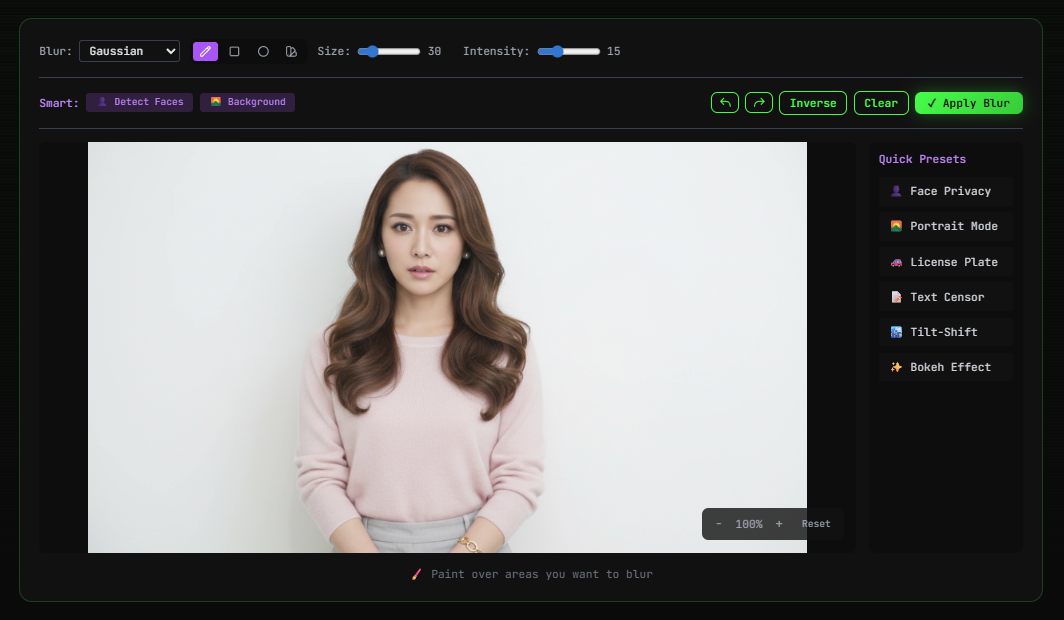
Get professional results instantly with 6 one-click presets:
- Face Privacy – Detect and blur all faces automatically
- Portrait Mode – Blur background to emphasize subject
- License Plate – Quick pixelation for vehicle plates
- Text Censor – Block out sensitive text
- Tilt-Shift – Miniature effect preset
- Bokeh Effect – Beautiful lens blur for backgrounds
How to Use Blur Image Online
Step 1: Upload
Drag and drop your image or click to browse. We support JPEG, PNG, and WebP up to 20MB.
Step 2: Select Blur Type
Choose from 7 blur types using the dropdown menu. Each type has its own character and best use cases.
Step 3: Mark Areas to Blur
Use the selection tools (brush, rectangle, circle, or lasso) to mark which parts of the image should be blurred. Or use Smart Features for automatic AI detection.
Step 4: Adjust Intensity
Use the intensity slider to control how strong the blur effect should be. Preview changes in real-time.
Step 5: Download
Export your blurred image in PNG, JPEG, or WebP format with adjustable quality settings.
Advanced Controls
- Undo/Redo – Keyboard shortcuts (Ctrl+Z/Y) for quick corrections
- Zoom & Pan – Get up close for precise work
- Inverse Selection – Blur everything except your selection
- Before/After Comparison – Toggle to see your changes
- Adjustable Brush Size – Fine-tune for detailed work
100% Client-Side Processing
Your images stay on your device. Unlike other blur tools that upload your photos to servers, our tool processes everything locally in your browser:
- ✅ No image uploads – complete privacy
- ✅ No waiting for server processing
- ✅ Works offline after page load
- ✅ No account required
Common Use Cases
- 🔒 Privacy Protection – Blur faces, license plates, and personal information
- 📸 Portrait Photography – Create professional background blur
- 📝 Document Redaction – Censor sensitive text and data
- 🖼️ Social Media – Protect identities while sharing photos
- 🏢 Real Estate – Blur neighboring properties
- 📰 Journalism – Protect source identities
Try It Now
Ready to blur with professional precision? Visit our Blur Image Online tool. Free, private, and no registration required.
Ready to verify your images?
Try our free AI image detector with 17 detection methods and 90%+ accuracy.
Try AI Photo Check Free