C2PA Metadata Remover
Remove C2PA content credentials, provenance data, and all embedded metadata from images. Strip AI-generation markers from OpenAI, Gemini, Adobe, and more — protect your privacy with one click.
Drop image here or click to upload
We'll strip all C2PA content credentials & metadata
JPEG, PNG, WebP, TIFF, HEIC (Max 20MB)
Removing C2PA metadata...
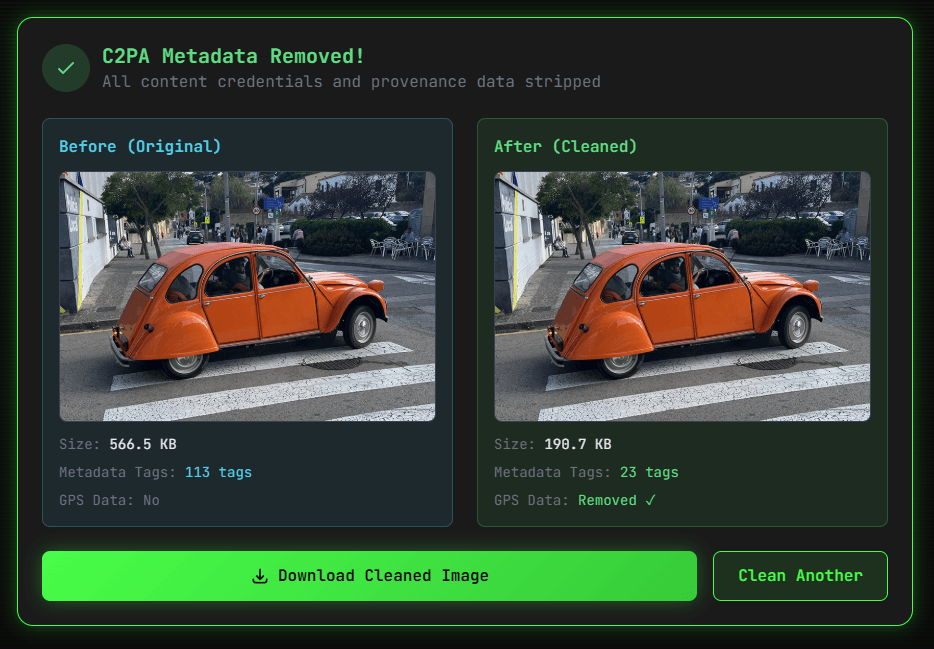
C2PA Metadata Removed!
All content credentials and provenance data stripped
Before (Original)
Size: -
Metadata Tags: -
GPS Data: -
After (Cleaned)
Size: -
Metadata Tags: 0
GPS Data: Removed ✓
// What Gets Removed
C2PA Manifests
Content credentials, digital signatures, provenance chains, and AI generation markers from Adobe, Google, Microsoft, OpenAI
EXIF & GPS Data
GPS coordinates, camera make/model, serial numbers, timestamps, lens info, and all EXIF/XMP/IPTC metadata
Edit History
Software used, editing history, author information, copyright notices, thumbnail previews, and ICC color profiles
// Frequently Asked Questions
What is C2PA metadata and why would I want to remove it?
C2PA (Coalition for Content Provenance and Authenticity) metadata is embedded data that records an image's creation history, editing tools, AI generation source, and digital signatures. You might want to remove it to protect your privacy, prevent tracking of your editing workflow, or strip provenance data before sharing images publicly online.
Does removing C2PA metadata affect image quality?
Our C2PA metadata remover preserves image quality by using high-quality encoding (95% for JPEG, lossless for PNG). The visual difference is imperceptible to the human eye. Only the hidden metadata is stripped — the actual pixel data remains virtually identical to the original image file.
What types of metadata does this tool remove?
This tool removes ALL metadata from images including C2PA content credentials, EXIF data (GPS location, camera info, timestamps), XMP data, IPTC data, ICC color profiles, thumbnail previews, and any other embedded metadata. The result is a clean image file with zero hidden information that could be used to track or identify you.
Is it legal to remove C2PA metadata from images?
In most jurisdictions, removing metadata from your own images is perfectly legal. However, removing provenance data from copyrighted images you don't own may violate terms of service or applicable laws. C2PA metadata removal is commonly used for privacy protection when sharing personal photos online, which is a legitimate and legal use case in virtually all countries.
Which image formats support C2PA metadata?
C2PA content credentials can be embedded in JPEG, PNG, WebP, TIFF, HEIC, AVIF, and several other image formats. Our tool supports all major image formats including JPEG, PNG, WebP, TIFF, and HEIC. Regardless of the input format, all C2PA manifests, signatures, and provenance chains are completely stripped from the output file.
How does C2PA metadata differ from regular EXIF data?
EXIF data stores basic camera settings, GPS coordinates, and timestamps. C2PA metadata is far more comprehensive — it includes cryptographic signatures, a full chain of custody showing every edit made to an image, the AI model used to generate it (like DALL-E, Midjourney, or Gemini), and digital certificates from organizations like Adobe, Google, and Microsoft.
Can C2PA metadata reveal that an image was AI-generated?
Yes, C2PA metadata can contain digitalSourceType tags that explicitly identify images as AI-generated. For example, images from Google Gemini, Adobe Firefly, and OpenAI DALL-E embed C2PA manifests declaring them as 'trainedAlgorithmicMedia'. Removing this metadata strips those AI origin markers from the image file completely.
Is this C2PA remover tool safe and private?
Yes, our tool is completely safe and privacy-focused. Your images are processed securely on our servers, never stored permanently, and deleted immediately after processing. We don't share your data with anyone, don't log image contents, and the cleaned result is sent directly to your browser for download. No account registration is required.
Can I remove C2PA metadata from multiple images at once?
Currently, our tool processes one image at a time for optimal quality and security. For batch processing, you can upload images sequentially — each takes only a few seconds. We recommend our EXIF Remover tool for general metadata stripping, and this C2PA-focused tool when you specifically need to remove content credentials and provenance data.
What is the maximum file size supported?
Our C2PA metadata remover supports image files up to 20MB in size. This covers virtually all photos from smartphones, digital cameras, and AI image generators. Supported formats include JPEG, PNG, WebP, TIFF, and HEIC. If your image exceeds this limit, consider using our Image Compressor tool first to reduce the file size.
Will social media platforms detect that C2PA data was removed?
Social media platforms cannot detect that C2PA metadata was removed. Once stripped, the image is indistinguishable from one that never had C2PA data. Many platforms like Instagram, Twitter/X, and Facebook actually strip most metadata themselves during upload, but removing it beforehand gives you full control over what information leaves your device.
How do I verify that C2PA metadata was successfully removed?
After processing, our tool shows a before/after comparison displaying the original metadata count versus the cleaned version (0 tags). You can also verify by uploading the cleaned image to our C2PA Checker tool at /c2pa-checker, which will confirm that no C2PA manifests or content credentials remain in the file.
Does this tool remove GPS location data too?
Yes, our C2PA metadata remover strips ALL metadata from images, including GPS coordinates, location data, camera serial numbers, timestamps, and C2PA content credentials. If you only need to remove GPS data while keeping other metadata intact, consider using our dedicated GPS Remover tool instead, which selectively removes only location information.
What is Content Authenticity Initiative (CAI)?
The Content Authenticity Initiative (CAI) was founded by Adobe and partners to develop standards for content provenance. C2PA is the technical specification that CAI created, defining how provenance data is embedded in media files. Both refer to the same system of content credentials — our tool removes all C2PA/CAI provenance data from your images.
Can removed C2PA metadata be recovered or restored?
No, once C2PA metadata is removed by our tool, it cannot be recovered or restored. The cryptographic signatures and manifest chains are permanently stripped from the image file. This is by design — the purpose of metadata removal is to ensure complete privacy. Always keep a backup of your original file if you might need the C2PA data in the future.
Which companies embed C2PA metadata in their AI images?
Major companies embedding C2PA content credentials include Google (Gemini, Imagen), Adobe (Firefly, Photoshop), Microsoft (Bing Image Creator, Designer), OpenAI (DALL-E, ChatGPT), Stability AI (Stable Diffusion), and Meta. These companies use C2PA to label AI-generated content, and our tool can strip all such provenance data from images.
Why do photographers remove C2PA metadata?
Photographers remove C2PA metadata for several privacy and business reasons: preventing competitors from seeing their editing workflow, removing location data from photos taken at private venues, stripping camera serial numbers that could be used for tracking, and avoiding false AI-detection flags from overly sensitive content moderation systems on social platforms.
How is C2PA metadata different from watermarks?
C2PA metadata is invisible data embedded in the file header, not a visual watermark on the image itself. It contains structured information about the image's origin and edit history. Visual watermarks are overlaid on the image pixels and require different removal techniques. Our tool specifically targets invisible metadata — for visual watermark issues, see our other tools.
Can I use this tool on my mobile phone?
Yes, our C2PA metadata remover works on all devices including smartphones, tablets, laptops, and desktops. Simply open the tool in any modern web browser (Chrome, Safari, Firefox, Edge), upload your image, and download the cleaned version. No app installation is required — everything runs directly in your browser with server-side processing for reliable results.