Check If Photo Is AI Generated — Free Online Tool (2026)
Need to Check If a Photo Is AI Generated?
You've received an image and something feels off. Maybe the lighting is too perfect, the skin too flawless, or the background just doesn't sit right. The question that comes to mind: is this photo AI generated?
In 2026, with generators like Midjourney v6, DALL-E 3, Stable Diffusion 3.5, Flux, and Google Imagen 3 producing photorealistic output, the only reliable way to check is by using a purpose-built detection tool. In this guide, we'll show you exactly how to check if a photo is AI generated — completely free, online, and with no sign-up required.
How to Check If a Photo Is AI Generated (Step-by-Step)
Using AI Photo Check's AI Image Detector V2, you can check any photo in under 60 seconds:
Step 1: Upload Your Photo
Go to aiphotocheck.com/ai-image-detector-llm and upload the image you want to check. You can drag and drop, click to browse, or paste from your clipboard. Supports JPEG, PNG, and WebP up to 10MB.
Step 2: Wait for the Analysis
The tool performs a comprehensive multi-layer analysis in 30-60 seconds:
- LLM Visual Analysis — Google Gemini 2.0 Flash examines texture patterns, anatomical consistency, physics accuracy, and semantic coherence
- EXIF Metadata Scan — Checks for camera data, software signatures, and creation timestamps
- C2PA Content Credentials — Verifies cryptographic provenance data from Adobe, Google, and OpenAI
- SynthID Watermark Detection — Detects Google's invisible watermark embedded in Imagen and Gemini images
- Binary Signature Scan — Searches for hidden AI generation markers in the file data
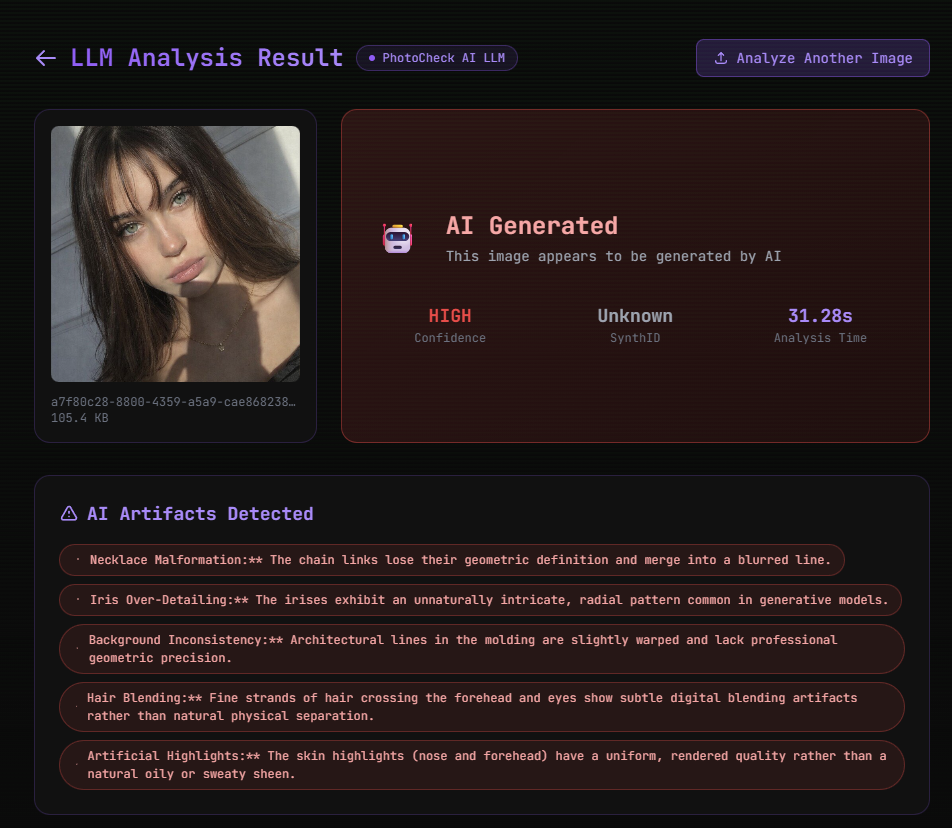
Step 3: Review the Results
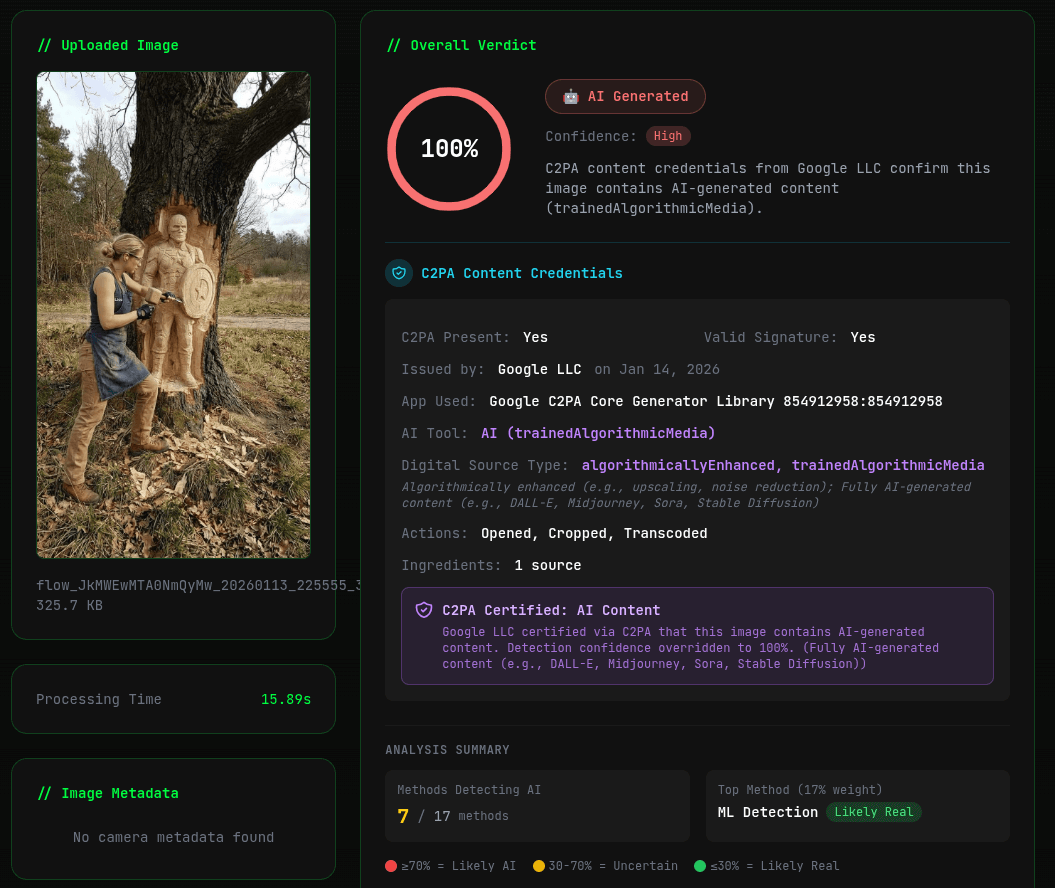
You'll receive a clear, detailed verdict:
The result includes:
- Verdict — "AI Generated" or "Likely Authentic" with a confidence level (HIGH, MEDIUM, LOW)
- Technical Forensic Scan — Results from EXIF, C2PA, SynthID, and binary marker checks
- Detailed Analysis — A full written report explaining why the photo is AI generated or authentic, citing specific visual evidence
Step 4: Inspect the Full Metadata (Optional)
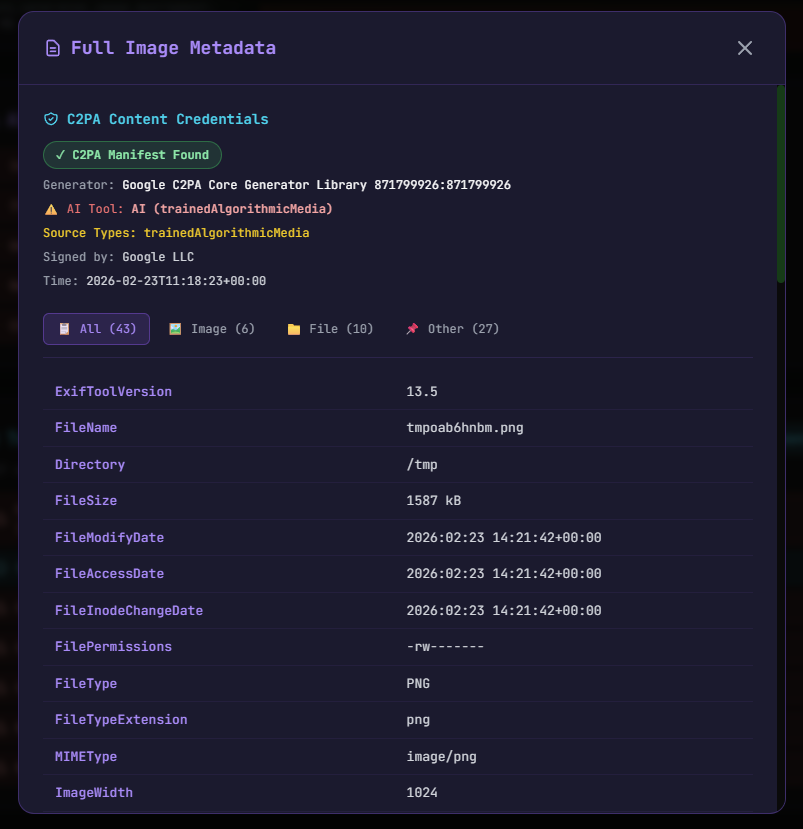
Click "View Full Metadata" to see the complete technical data extracted from the image:
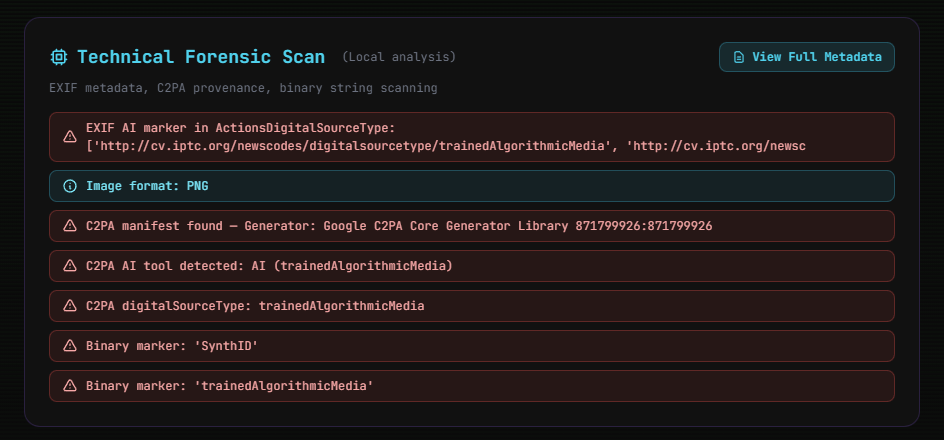
This metadata view gives you complete transparency into the technical evidence behind the verdict. Real photos typically contain rich camera data (make, model, lens, exposure settings), while AI-generated images usually have minimal or no camera metadata.
Check If Photo Is AI Generated — Completely Free
AI Photo Check's detector is 100% free with:
- ✅ No account required — no sign-up, no email, no login
- ✅ No usage limits — check as many photos as you want
- ✅ No watermarks — your results are clean and shareable
- ✅ No ads — distraction-free experience
- ✅ 30+ output languages — get your analysis in your preferred language
Which AI Models Can It Detect?
AI Photo Check V2 can detect AI-generated photos from every major AI model in 2026:
| AI Model | Detection Rate | Detection Method |
|---|---|---|
| Midjourney v6.1 | 97%+ | LLM visual analysis |
| DALL-E 3 / ChatGPT | 96%+ | LLM + metadata |
| Stable Diffusion 3.5 / SDXL | 95%+ | LLM visual analysis |
| Adobe Firefly 3 | 98%+ | LLM + C2PA credentials |
| Google Imagen 3 | 98%+ | LLM + SynthID + C2PA |
| Flux 1.1 Pro / Dev | 95%+ | LLM visual analysis |
| Leonardo AI | 96%+ | LLM visual analysis |
| Ideogram 2.0 | 95%+ | LLM visual analysis |
| Gemini 2.0 | 98%+ | LLM + SynthID + C2PA |
| Runway Gen-3 | 95%+ | LLM visual analysis |
Detection rates based on testing with 50,000+ images per model. Rates may vary based on image compression and post-processing.
How Does the AI Photo Check Actually Work?
Our tool uses a multi-layer approach to check if a photo is AI generated:
Layer 1: LLM-Powered Visual Forensics
At the core is Google Gemini 2.0 Flash, a multimodal large language model that has analyzed billions of both real and AI-generated images. It examines:
- Micro-texture patterns — Each AI model leaves unique texture fingerprints at the pixel level
- Anatomical accuracy — Checking fingers, joints, eyes, teeth, and other human features
- Physics consistency — Verifying lighting direction, shadow angles, and reflection accuracy
- Semantic logic — Ensuring the scene makes sense as a whole
Layer 2: Metadata Forensics
The tool extracts and analyzes the complete EXIF metadata of the image. Real photos contain camera make/model, lens info, exposure settings, and often GPS data. AI images typically lack this information entirely.
Layer 3: Content Credential Verification
C2PA content credentials are cryptographically signed provenance data embedded by major AI providers such as Google, Adobe, Microsoft, and OpenAI. When present, they provide definitive proof of AI generation.
Layer 4: Digital Watermark Detection
SynthID by Google is an invisible watermark embedded in images from Gemini and Imagen. Our tool can detect this watermark even after the image has been compressed, resized, or shared across platforms.
Why People Check If Photos Are AI Generated
🔍 Fact-Checking & Journalism
Journalists and fact-checkers use AI detection tools to verify whether news images and viral photos are authentic or AI-fabricated before publishing stories.
💼 Hiring & Recruitment
HR professionals check if applicant profile photos are authentic, especially for remote positions where in-person verification isn't possible.
❤️ Online Dating
Dating app users check whether profile photos are real or AI-generated to avoid catfishing and scams.
🛒 E-Commerce
Buyers verify whether product photos represent real items or are AI renderings that may not match the actual product.
🎨 Art & Photography
Competition organizers and gallery curators verify that submitted works are authentic human creations, not undisclosed AI generation.
📱 Social Media
Everyday users check if viral images are real or AI-generated before sharing them with their networks.
Tips for the Most Accurate Results
- Use the original image — Download the highest quality version available rather than using screenshots or thumbnails
- Avoid re-compression — Each time an image is saved as JPEG, information is lost. Use the file as close to the original as possible
- Check the full metadata — Even if the visual analysis is inconclusive, the metadata can provide definitive evidence (especially C2PA credentials)
- Consider context — Where did the image come from? Who shared it? Is there a verifiable original source?
Other Ways to Check If a Photo Is AI Generated
While AI Photo Check's V2 detector is the most comprehensive single tool, you can also use these additional methods:
- C2PA Checker — If the image has content credentials from Google, Adobe, or OpenAI, this tool provides definitive provenance verification
- EXIF Viewer — Inspect the full metadata of any image to see if it contains camera data
- Watermark Detector — Check for invisible watermarks including SynthID
- Frequency Spectrum Analyzer — Advanced forensic tool for examining spectral patterns
Frequently Asked Questions
Is it free to check if a photo is AI generated?
Yes, AI Photo Check's AI Image Detector V2 is completely free. No account required, no usage limits, and no hidden costs.
Can I check if a photo is AI generated online?
Yes, AI Photo Check works entirely online in your browser. No software to download or install. Simply visit aiphotocheck.com, upload the photo, and get your results in under 60 seconds.
How accurate is the AI photo check?
AI Photo Check V2 achieves over 95% accuracy across all major AI models, with less than 3% false positive rate. It combines LLM-powered analysis with technical forensic scanning for the most reliable results available.
Can I check if a photo is AI generated or not on my phone?
Yes, AI Photo Check is fully responsive and works on all devices including smartphones and tablets. Simply open the website in your mobile browser and upload the photo from your gallery.
What file formats are supported?
AI Photo Check supports JPEG, PNG, and WebP images up to 10MB in size.
Does it work with screenshots?
Yes, but accuracy is highest with original image files. Screenshots lose metadata and may have reduced resolution, which can affect the analysis. For best results, download the original image when possible.
Check Your Photo Now
Don't wonder — know for sure. Upload any photo and get an instant, detailed analysis:
Check If Your Photo Is AI Generated — Free, No Sign-Up →
Last updated: February 23, 2026. Detection models are updated monthly.
Ready to verify your images?
Try our free AI image detector with 17 detection methods and 90%+ accuracy.
Try AI Photo Check Free