How to Remove Gemini AI Watermarks from Images: Lossless Removal Guide 2026

Google Gemini embeds an invisible watermark in every AI-generated image — a semi-transparent logo blended into the bottom-right corner using alpha compositing. While barely visible to the naked eye, this watermark can be detected through pixel analysis and may cause issues for legitimate use cases.
In this guide, we explain how the Gemini AI watermark works, why you might want to remove it, and how to do so losslessly using our free Gemini Watermark Remover tool.
What Is the Gemini AI Watermark?
When Google Gemini generates an image, it embeds a semi-transparent white logo in the bottom-right corner. This watermark is applied using alpha compositing — a standard technique for blending images with transparency.
The watermark has two variants based on image size:
- 48×48 pixels — Used for images where either dimension is ≤ 1024px, positioned with 32px margin from edges
- 96×96 pixels — Used for larger images (both dimensions > 1024px), positioned with 64px margin from edges
The alpha values are very low (typically 2-5% opacity), making the watermark nearly invisible against most backgrounds. However, it becomes noticeable on very dark or uniform backgrounds, and it can always be detected through programmatic pixel analysis.
How Alpha Compositing Works
Google Gemini applies the watermark using a standard alpha blending formula:
watermarked_pixel = α × logo_pixel + (1 - α) × original_pixelWhere:
αis the transparency value from the watermark's alpha map (0.0 = fully transparent, 1.0 = fully opaque)logo_pixelis always 255 (white) for the Gemini watermarkoriginal_pixelis the true, unwatermarked pixel value
This formula is applied independently to each RGB channel of every pixel in the watermark region.
How Reverse Alpha Blending Removes the Watermark
Since we know the exact alpha compositing formula used to apply the watermark, we can mathematically reverse it to recover the original pixel:
original_pixel = (watermarked_pixel - α × 255) / (1 - α)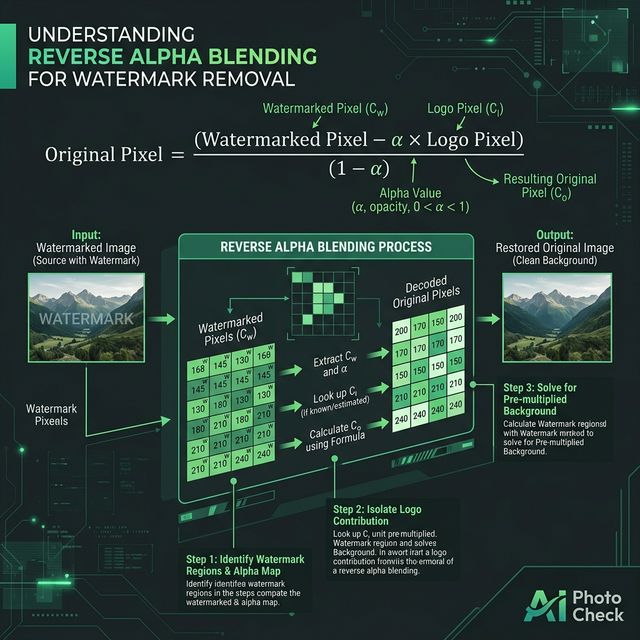
This approach is fundamentally different from AI-based inpainting or cloning tools:
| Method | Approach | Quality | Accuracy |
|---|---|---|---|
| Reverse Alpha Blending | Mathematical formula using known alpha map | Lossless — pixel-perfect | Exact reconstruction |
| AI Inpainting | Neural network guesses missing content | Lossy — introduces artifacts | Approximate guess |
| Clone Stamp | Manual copying from nearby areas | Lossy — visible seams | Manual, imprecise |
| Crop | Cut off the watermark area | Loss of content | N/A — removes content |
What Are Alpha Maps?
The key to precise watermark removal is knowing the exact alpha (transparency) values for each pixel in the watermark. These are captured by generating images on a known background:
- Generate on solid black background — Request Gemini to generate a pure black image
- Extract the watermark pattern — Since α × 255 + (1 - α) × 0 = α × 255, each pixel's brightness directly reveals the alpha value
- Build the alpha map — Store these values as a Float32Array for sub-pixel precision
Our tool uses pre-captured alpha maps for both 48×48 and 96×96 watermark variants, eliminating the need for any calibration step. The alpha maps are embedded directly in the tool.
How to Remove Gemini Watermarks (Step-by-Step)
Our Gemini Watermark Remover makes the process instant:
- Open the tool — Go to aiphotocheck.com/gemini-watermark-remover
- Upload your Gemini image — Drag-and-drop or click to select (PNG, JPEG, WebP supported)
- Instant processing — The tool auto-detects the watermark variant, applies multi-pass Reverse Alpha Blending, and shows the result in milliseconds
- Download the result — Get your watermark-free image as a lossless PNG

100% Client-Side: Your Images Never Leave Your Browser
Unlike most image processing tools, our Gemini Watermark Remover runs entirely in your web browser. Here's what that means:
- No server upload — Your images are never sent to any server
- No data collection — We can't see, log, or store your images
- No network required — After the page loads, you can disconnect from the internet and the tool continues working
- No account needed — No registration, no login, no tracking
The entire watermark removal algorithm — including the alpha maps, blending logic, and multi-pass validation — runs as JavaScript in your browser using the HTML5 Canvas API.
Multi-Pass Removal: Handling Double Watermarks
Some Gemini-generated images may have multiple watermark layers applied (e.g., if post-processing reapplied the watermark). Our tool handles this through iterative multi-pass removal:
- Pass 1 — Apply Reverse Alpha Blending and measure residual watermark signal
- Safety checks — Verify the image isn't being degraded (near-black ratio, texture collapse detection)
- Pass 2-4 — If residual signal remains above threshold, apply additional passes
- Auto-stop — The process halts when signal drops below the threshold or safety limits are reached
Typical images require only 1-2 passes. The maximum is capped at 4 passes to prevent over-processing.
Limitations and Best Practices
When It Works Best
- Original, unmodified Gemini-generated images
- Images in their original resolution and format
- PNG images (no additional JPEG compression artifacts)
When It May Not Work
- Resized images — If the image has been resized, the watermark position and alpha alignment shift
- Cropped images — If the bottom-right corner is cropped away, the watermark region is missing
- Screenshots — Screen capture introduces additional compression and scaling
- Re-encoded images — Heavy JPEG recompression adds noise that interferes with precise alpha reversal
- Non-Gemini images — The tool only removes Gemini's specific watermark pattern. Other AI watermarks require different approaches
Gemini Watermark vs SynthID: What's the Difference?
Google actually uses two separate watermarking systems on Gemini images:
| Feature | Gemini Logo Watermark | SynthID |
|---|---|---|
| Type | Visual (alpha-composited logo) | Imperceptible (frequency domain) |
| Visibility | Nearly invisible, detectable by zoom | Completely invisible |
| Location | Bottom-right corner | Spread across entire image |
| Removal | ✅ Reversible via alpha blending | ❌ Extremely difficult to remove |
| Survives Editing | Removed by resize/crop | Survives most edits |
Our Gemini Watermark Remover removes the visual alpha-composited logo. It does NOT remove SynthID, which is a fundamentally different watermarking technology. To detect SynthID, use our Invisible Watermark Detector.
Technical Implementation Details
For developers and researchers, here's what happens under the hood:
- Image Loading — The uploaded image is drawn onto an HTML5 Canvas to get raw ImageData (RGBA pixel array)
- Size Detection — The tool checks image dimensions against Gemini's official size catalog, falling back to the 48/96 threshold heuristic
- Alpha Map Selection — Pre-embedded Float32Array alpha maps are loaded for the detected watermark size. Non-standard sizes are handled via bilinear interpolation
- Position Calculation — Watermark position computed as: x = width - marginRight - logoSize, y = height - marginBottom - logoSize
- Reverse Alpha Blending — For each pixel in the watermark region: original = (watermarked - α × 255) / (1 - α), clamped to [0, 255]
- Multi-Pass Validation — Spatial correlation scoring determines if additional passes are needed
- PNG Export — The cleaned canvas is exported as a lossless PNG blob for download
The entire process typically completes in under 50 milliseconds on modern hardware.
Related AI Image Tools
- Gemini Watermark Remover — Remove Gemini AI watermarks losslessly
- Invisible Watermark Detector — Detect SynthID, Stable Signature, and other hidden watermarks
- C2PA Metadata Remover — Strip C2PA content credentials and provenance data
- C2PA Checker — Verify C2PA content credentials in images
- AI Image Detector — Comprehensive AI detection with 17+ forensic methods
Ready to verify your images?
Try our free AI image detector with 17 detection methods and 90%+ accuracy.
Try AI Photo Check Free