How to Remove C2PA Metadata from Images: Complete Privacy Guide 2026
In 2026, C2PA content credentials are embedded in images from every major AI generator — Google Gemini, Adobe Firefly, OpenAI DALL-E, Midjourney, and more. While these credentials serve transparency, there are legitimate reasons you may want to remove C2PA metadata from your images before sharing them online.
This guide explains what C2PA metadata contains, why you might want to remove it, and how to strip it completely using our free C2PA metadata remover tool.
What C2PA Metadata Contains (And Why It Matters for Privacy)
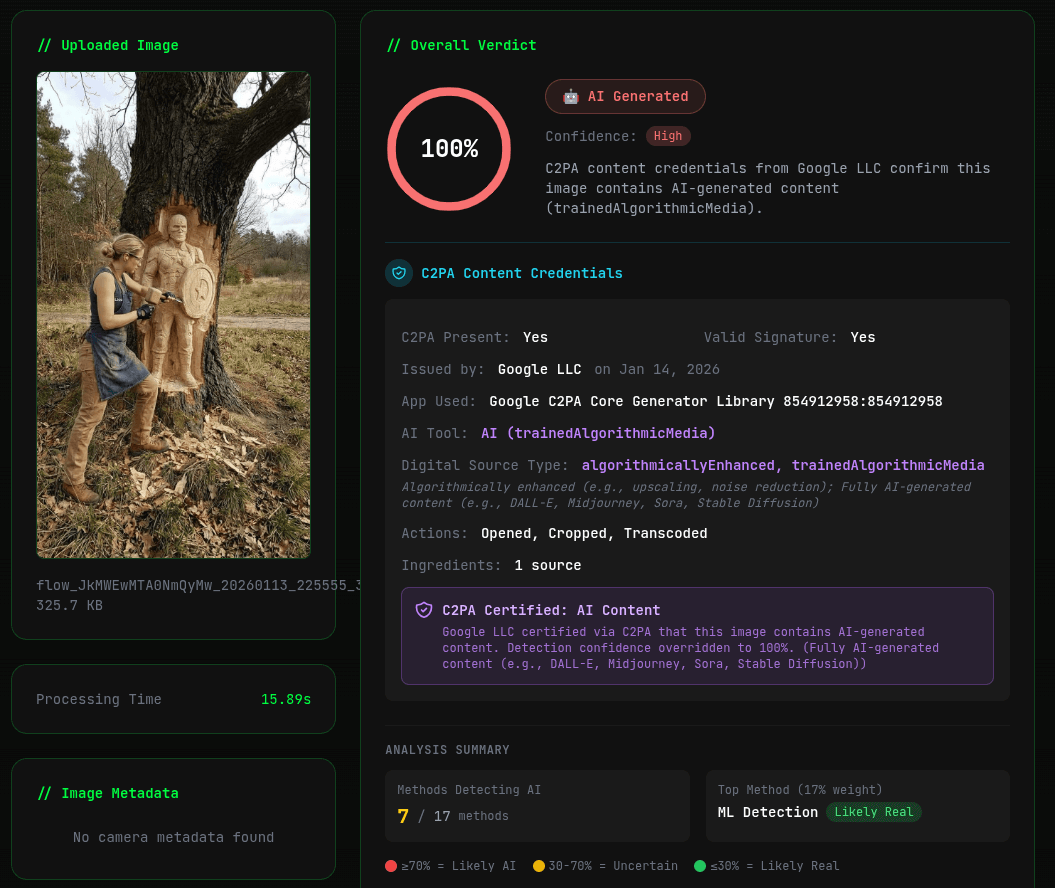
C2PA (Coalition for Content Provenance and Authenticity) metadata goes far beyond simple EXIF data. Here's what can be embedded in your images:
- AI Generation Source — The specific AI model used (e.g., "Generated by Google Gemini", "Created with Adobe Firefly")
- Digital Source Type — Tags like
trainedAlgorithmicMediathat explicitly label images as AI-generated - Cryptographic Signatures — Digital certificates from the issuer (Google LLC, Adobe Inc., OpenAI)
- Edit History Chain — Every software tool used to edit the image, in order
- Ingredient Manifests — Source images used in composites, including their own provenance data
- Timestamps — When the image was created and when each edit was made
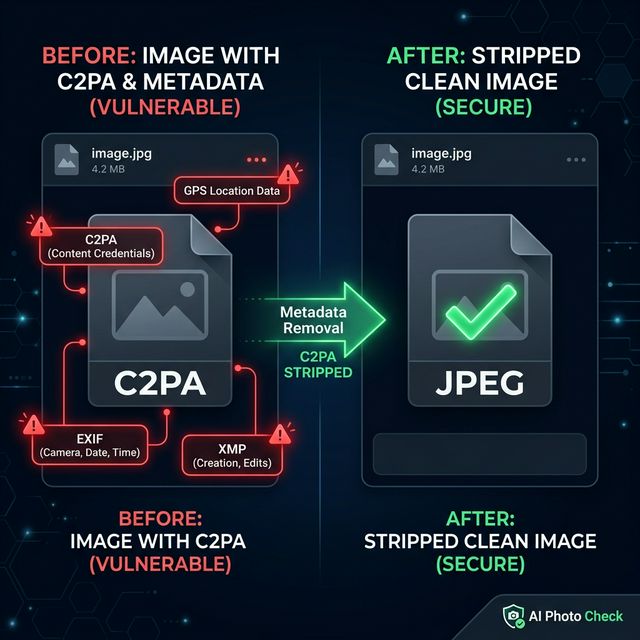
- EXIF/XMP/IPTC Data — Camera info, GPS coordinates, author details, copyright notices
This means a single image file can contain a complete digital fingerprint revealing who created it, how it was created, what tools were used, and where/when it was made. For privacy-conscious users, removing this data before sharing is essential.
5 Legitimate Reasons to Remove C2PA Metadata
1. Privacy Protection
C2PA credentials can reveal your identity through digital certificates, your editing workflow through action history, and your location through embedded GPS data. Stripping this data before posting on social media or forums protects your personal information from being harvested by data brokers or bad actors.
2. Avoid False AI Detection
Some content moderation systems flag images with C2PA AI markers for additional scrutiny or restrictions. If you've legitimately enhanced a real photograph using AI tools (like Adobe's AI-powered filters), the resulting compositeWithTrainedAlgorithmicMedia tag might cause your authentic photo to be incorrectly flagged as "AI-generated". Removing the C2PA data prevents this false categorization.
3. Professional Photography Workflow
Photographers may want to prevent competitors from seeing their exact editing workflow, software stack, and post-processing pipeline — all of which are recorded in C2PA action history chains. Removing the metadata protects their competitive advantage and trade secrets.
4. File Size Reduction
C2PA manifests with full ingredient chains and multiple signatures can add significant overhead to image files — sometimes 50KB or more of embedded data. Stripping all metadata results in a leaner file, which matters for web performance and email attachments.
5. Consistent Distribution
When distributing images across multiple platforms, inconsistent metadata handling can cause issues. Some platforms strip metadata, others don't. By removing all metadata upfront, you ensure consistent, predictable results regardless of the destination platform.
How to Remove C2PA Metadata (Step-by-Step)
Our C2PA Metadata Remover makes the process simple:
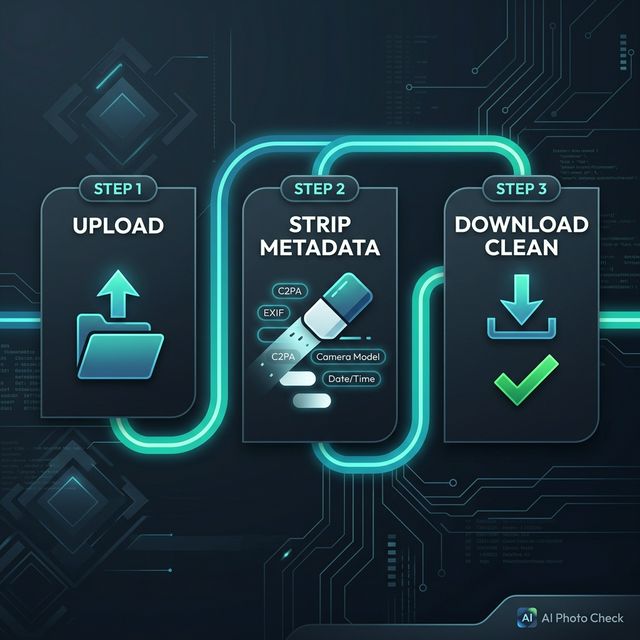
- Upload your image — Go to aiphotocheck.com/c2pa-metadata-remover and drag-and-drop your image (supports JPEG, PNG, WebP, TIFF, HEIC up to 20MB)
- Automatic processing — The tool instantly strips ALL metadata: C2PA manifests, digital signatures, EXIF data, GPS coordinates, XMP/IPTC, thumbnails, and ICC profiles
- Download the cleaned image — Get your metadata-free image with high-quality encoding (95% JPEG, lossless PNG). View the before/after comparison showing exactly how many tags were removed
What Exactly Gets Removed?
Our tool performs a complete metadata strip, removing:
| Metadata Type | Examples | Privacy Risk |
|---|---|---|
| C2PA Manifests | Content credentials, digital signatures, provenance chains | Reveals AI generation source, editing pipeline |
| EXIF Data | Camera model, lens, settings, serial number | Device identification, tracking |
| GPS Coordinates | Latitude, longitude, altitude | Physical location tracking |
| XMP/IPTC | Author name, copyright, keywords | Identity revelation |
| Timestamps | Creation date, modification dates | Activity pattern analysis |
| Software Info | Editing software, version numbers | Workflow fingerprinting |
| Thumbnails | Embedded preview images | May contain pre-crop content |
Does Removing C2PA Metadata Affect Image Quality?
Our tool preserves visual quality by re-encoding images at high quality settings:
- JPEG images — Re-encoded at 95% quality. The difference is imperceptible to the human eye (typical PSNR > 48dB)
- PNG images — Lossless re-encoding. Zero quality difference from the original
- WebP images — Re-encoded at 95% quality for lossy, lossless for lossless WebP
The tool works by decoding the image to raw pixels, then re-encoding it without any metadata. This means only the metadata bytes are removed — the actual image content remains virtually identical. For PNG files, the output is bit-for-bit identical in terms of pixel values.
How to Verify C2PA Metadata Was Successfully Removed
After stripping metadata, you can verify the result using these methods:
- Built-in comparison — Our tool shows a before/after view with the exact number of metadata tags removed
- C2PA Checker — Upload the cleaned image to our C2PA Checker — it should report "No C2PA content credentials found"
- EXIF Viewer — Use our EXIF Viewer to confirm zero metadata tags remain
C2PA Metadata vs EXIF Data: What's the Difference?
While both are types of image metadata, they serve different purposes:
| Feature | EXIF Data | C2PA Content Credentials |
|---|---|---|
| Purpose | Camera settings, technical info | Content provenance, authenticity proof |
| Security | Easily edited or stripped | Cryptographically signed, tamper-evident |
| AI Detection | Software name only | Explicit AI model identification |
| Edit History | Last software used | Complete action chain with ingredients |
| Who Embeds It | Cameras, photo editors | AI generators, creative tools, cameras |
Our C2PA Metadata Remover strips both types completely — EXIF, C2PA, and everything in between.
Which Companies Embed C2PA Metadata in 2026?
As of March 2026, these major companies embed C2PA content credentials in their AI-generated images:
- Google — Gemini, Imagen (signed by Google LLC)
- Adobe — Firefly, Photoshop, Lightroom (signed by Adobe Inc.)
- OpenAI — DALL-E, ChatGPT (signed by OpenAI)
- Microsoft — Bing Image Creator, Designer (signed by Microsoft)
- Stability AI — Stable Diffusion (via official tools)
- Meta — Imagine AI (signed by Meta Platforms)
Additionally, camera manufacturers like Sony, Nikon, Leica, and Samsung are embedding C2PA credentials in camera-captured photos to prove they are authentic, real photographs.
Legal Considerations
Removing metadata from your own images is legal in virtually all jurisdictions. However, keep these points in mind:
- Removing provenance data from copyrighted images you don't own may violate terms of service
- Some regulations (like the EU AI Act) may require AI-generated content to be labeled — removing C2PA markers could conflict with these requirements in professional/commercial contexts
- Removing C2PA from images for the purpose of misrepresentation (e.g., passing AI art as original photography) may constitute fraud
Our tool is designed for legitimate privacy protection — removing personal data from your own images before sharing online.
Related Privacy Tools
AI Photo Check offers a complete suite of privacy and metadata tools:
- C2PA Metadata Remover — Strip all C2PA content credentials and metadata
- EXIF Remover — Remove all EXIF metadata from images
- GPS Remover — Selectively strip only GPS location data
- Batch GPS Remover — Remove GPS from multiple images at once
- C2PA Checker — Verify C2PA content credentials before and after removal
- EXIF Viewer — Inspect all metadata in your images
Ready to verify your images?
Try our free AI image detector with 17 detection methods and 90%+ accuracy.
Try AI Photo Check Free