Image Border Online - Advanced Photo Framing Tool
Introduction
Whether you're preparing images for social media, creating a cohesive portfolio, or simply adding a professional touch to your photos, borders can make all the difference. Today, we're excited to introduce our new Image Border Online tool – a powerful, free, and privacy-focused way to add beautiful frames to your images.
What Makes This Tool Special?
Unlike basic border tools that only offer solid color options, our Image Border Online tool provides a comprehensive set of features that rival desktop software – all running directly in your browser.
🎨 Multiple Border Types
Solid Color
The classic choice. Pick any color using our intuitive color picker with hex input support. Quick-select buttons for popular colors like black, white, and vibrant tones make it even easier.
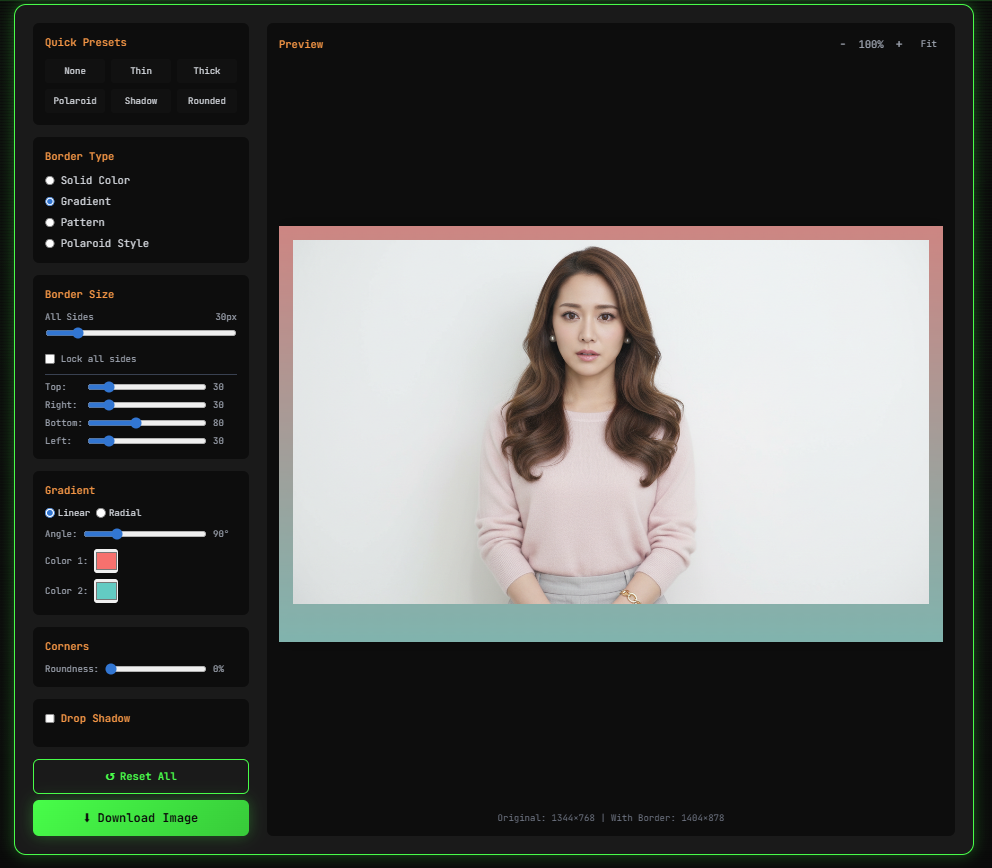
Gradient Borders
Take your images to the next level with smooth color transitions. Choose between linear and radial gradients, adjust the angle from 0° to 360°, and select your preferred color stops for stunning visual effects.
Pattern Borders
Add texture and personality with built-in patterns:
- Dots – playful and modern
- Stripes – clean and structured
- Checks – classic checkerboard style
- Diagonal – dynamic and energetic
Polaroid Style
Recreate the iconic instant photo look with a larger bottom margin, perfect for adding captions or maintaining that nostalgic aesthetic.
📐 Precision Size Controls
- Uniform sizing – same border width on all sides (0-200px)
- Individual control – set different values for top, right, bottom, and left
- Lock/unlock toggle – easily switch between uniform and custom sizing
🔘 Rounded Corners
Transform your rectangular borders into smooth, rounded frames. The corner radius slider lets you choose anything from sharp squares (0%) to fully rounded edges (100%).
💫 Drop Shadow Effects
Add depth and dimension with customizable drop shadows:
- Offset X/Y – position the shadow precisely
- Blur radius – soft diffused shadows or sharp outlines
- Shadow color – match your design or create contrast
⚡ Quick Presets
Don't want to configure everything manually? Use our 6 one-click presets:
- None – remove all borders
- Thin – subtle 10px black border
- Thick – bold 50px white border
- Polaroid – classic instant photo style
- Shadow – white border with elegant drop shadow
- Rounded – modern rounded corners with black border
How to Use Image Border Online
Step 1: Upload Your Image
Drag and drop your image onto the upload zone, or click to browse. We support JPEG, PNG, and WebP formats up to 50MB.
Step 2: Choose Your Style
Select a quick preset for instant results, or dive into the customization options – pick your border type, adjust the size, and customize colors and effects.
Step 3: Fine-Tune
Enable rounded corners for a softer look, add a drop shadow for depth, or experiment with gradient angles until you find the perfect combination.
Step 4: Download
Choose your output format (PNG, JPEG, or WebP), adjust the quality slider, and download your beautifully bordered image.
100% Privacy – No Server Uploads
Your images never leave your device. All processing happens directly in your browser using the HTML5 Canvas API. This means:
- ✅ No waiting for uploads
- ✅ No data sent to servers
- ✅ Complete privacy and security
- ✅ Works offline (after initial page load)
Who Is This Tool For?
- 📸 Photographers – Add consistent borders to photo collections
- 📱 Social Media Managers – Create branded, cohesive feeds
- 🛒 E-commerce Sellers – Professional product image presentation
- 🎨 Designers – Quick border mockups without opening heavy software
- 👤 Everyone – Simple, free, and effective image enhancement
Try It Now
Ready to add beautiful borders to your images? Head over to our Image Border Online tool and start creating. No registration required, completely free, and your images stay private.
Ready to verify your images?
Try our free AI image detector with 17 detection methods and 90%+ accuracy.
Try AI Photo Check Free